Embed GIF Link Image

Embed GIF Link Image

Embed Gif Link
The Gif link allows you to embed a flipping image on your site or email. 
To get that link, start at the main Dashboard.

Under the My Editions section, click on the Link icon:


The Embed Links box will pop up. Copy/paste the gif link. 


This is the link you use to embed the gif flipping image on your site or wherever you will embed it. When you copy and paste the link, only select from the "https to the .gif" part of the link.


Use Gif in Email

Follow the steps below to add the flipping image in your email.

1. On the main dashboard, under My Editions, click the Link icon, as in the steps listed above.
2. Under the Embed Link pop up box, locate the Gif flipping image:


3. Hover over the Gif image with your mouse cursor. Right click to bring up the menu, the click Copy Image:


4. Now paste the image in your email
5. Once done, highlight the image and click Insert link


6. Go back to the DCatalog page and copy the Short HTML5 link


7. Paste the link by clicking the GIF, then click Change. Enter the link and you can change the alt text too.
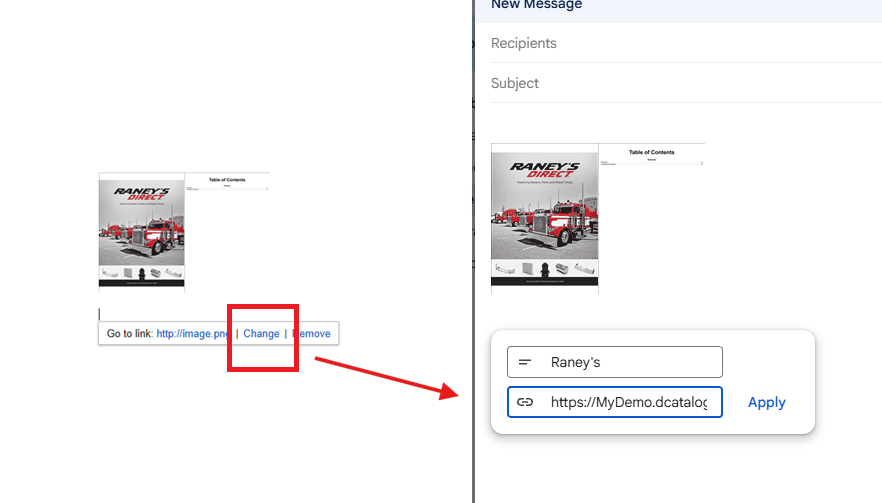

Please note that in some email browsers, such as Gmail, the image will not flip.


    • Related Articles

    • Embed GIF Link Image

      The gif link allows you to embed a flipping image on your site. Embed Gif Link To get that link, start at the main Dashboard. Under the My Editions section, click on the Link icon: The Embed Links box will pop up. Copy/paste the gif link. This is the ...
    • Stock images and GIF Hub

      Now you can upload stock images or GIFs from our hub of saved images. Open the multimedia manager: Click the image icon under Tools: The Import Image box will pop up, with several options to choose from. To locate the stock images, click the Stock ...
    • How to Share or Distribute My Flipbook

      How to Share or Distribute My Flipbook? Once your edition is ready to be shared, there are several ways to use the link options presented. With Dcatalog, you can distribute your digital edition in many different ways. This article will guide you ...
    • What are the recommended dimensions and quality settings for the product images used in the image URLs?

      Recommended Dimensions and Quality Settings for Product Images Each layout has unique requirements, these serve as general starting points. All images must be hosted on publicly accessible URLs, such as: Your website's media library A server Images ...
    • Embed Your Edition on Your Website: A Step-By-Step Guide

      DCatalog offers flexible ways to showcase your digital editions directly on your website. Whether you want to embed a specific edition, always display the most recent version, or present your entire virtual library, this guide outlines each method so ...